
AW Player
AWY StudioVideo Players & Editors
3.329.00 Reviews
- Version
- 3.2
- Installs
- 500.00K
- Age Rating
- Everyone
Screenshots
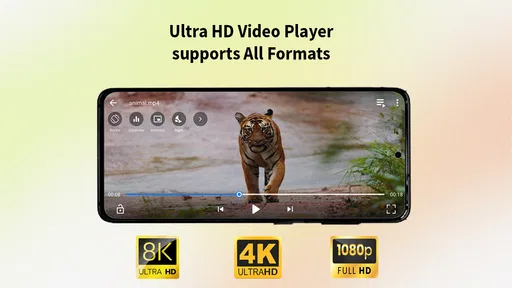
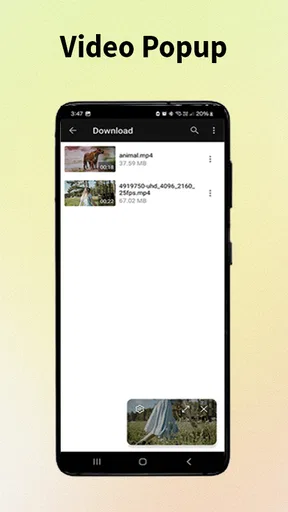
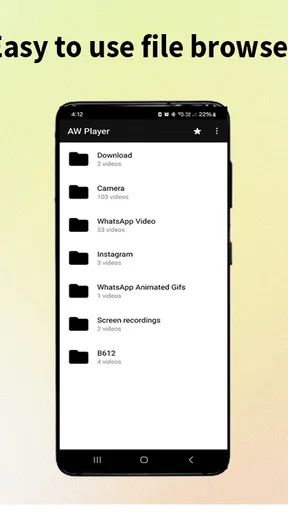
Our Review of AW Player
 Analysis by Appyee
AW Player is an Android video player from AWY Studio that takes a straightforward approach: it gives you a dedicated place to open and watch video files instead of relying on the player built into a gallery, file manager, or messaging app. I spent time looking at it as a practical everyday tool rather than treating the word “powerful” in its store summary as proof that it replaces every established player. My impression is more measured: it is an accessible option for people who want a separate video-watching app, but its value depends heavily on how much control you expect over playback.
The app is free to install and is suitable for Everyone, which makes it easy to try on a wide range of Android devices. It supports phones and tablets running Android 6.0 or later, and the current release is version 3.2. Its developer is AWY Studio. The app has passed the half-million-install mark, while its average rating sits at 3.3 from roughly eight hundred ratings. That combination tells me there is genuine interest, but also that I should not recommend it blindly to someone who expects a polished, feature-packed replacement for every other video player.
AW Player’s central strength: keeping video playback separate
The most useful capability to focus on here is not a particular visual effect or a long list of controls. It is the simple separation between watching a video and the app that originally stored or received it. When I open a clip through a gallery or a file manager, I often get a basic player that disappears as soon as I close the file. A dedicated player can make repeated viewing more comfortable because I can return to the same app whenever I need to watch local videos.
That distinction matters in ordinary situations. A downloaded tutorial, a family recording, a screen capture, or a video shared through another app may all live in different folders. AW Player is most appealing when I want one familiar destination for those files rather than a different playback experience every time. The benefit is organizational and practical: I can think about watching the video, not about which app happens to own it.
I would not interpret that capability as automatic proof that every format, audio track, subtitle type, or unusual encoding will work perfectly. The app’s identity is clear enough as a video player, but real-world files vary widely. A phone-recorded clip is a much safer test than a specialized file downloaded from an unfamiliar source. If your library contains unusual media, I would install AW Player alongside your existing player first and compare the files you actually use.
The best reason to try AW Player is convenience, not a promise that it will solve every playback problem. That distinction prevents disappointment. Someone who mainly watches standard clips on an Android phone may appreciate the focused experience. Someone who needs a media toolbox for demanding formats, network libraries, or advanced subtitle work should judge it against those requirements before making it the main player.
What the separate-player approach changes day to day
When a video is opened from a messaging app, the first concern is often speed: tap the file, watch it, close it. That is fine for a one-off clip, but it becomes less comfortable when I need to revisit the same material. A dedicated player gives the task a clearer home. I can use it for a saved lecture, a rehearsal recording, or a reference clip without treating the original sharing app as my media library.
There is also a small privacy and concentration advantage in keeping playback away from social feeds. If I am reviewing a recording, I do not need to move through a stream of unrelated posts or notifications to reach it. AW Player does not turn a phone into a full media center, but its narrow purpose can be useful for people who prefer fewer distractions while watching local content.
One practical tip is to test the app with three different files before deciding whether it fits: a short camera recording, a longer downloaded video, and a clip received through another app. Those files represent different everyday paths into playback. If all three behave comfortably, the app is more likely to suit your routine than if you judge it from a single sample.
How I would use it in practice
My first step would be to install the free version and open videos from more than one location. I would not begin by importing or reorganizing an entire library. Instead, I would use the Android file picker or the “open with” choice attached to a video, then see whether AW Player feels natural when launched from that route. This is a better test of real convenience than simply opening the app once from the home screen.
For a clean workflow, I would create a small temporary folder containing the videos I watch most often. That makes it easier to compare how quickly I can reach familiar files and whether the app fits the way I already store media. It also avoids an easy mistake: confusing the app’s ability to play a file with the phone’s ability to locate it. If a video is buried in a confusing folder, the player cannot make that discovery process pleasant by itself.
In everyday use, I would treat AW Player as a viewing tool rather than a complete file-management system. I would keep naming and organizing important recordings elsewhere, then use the player to open them. This separation is useful because it prevents the player from becoming responsible for tasks it may not be designed to handle. It also makes switching to another player less disruptive if a particular file needs a different solution.
Another useful habit is to test playback after downloading a file over a mobile connection, not only after saving it through a computer. A file can be incomplete or damaged even when it appears in a folder. If one clip refuses to play, I would first check the file itself and try another known-good video before blaming the app. That simple troubleshooting step avoids drawing the wrong conclusion from a bad download.
A realistic everyday scenario
Imagine that I record a short presentation on my phone, receive a second version through a chat, and download a reference clip for the next day’s meeting. In the evening, I want to review all three without returning to the camera app, chat thread, and browser separately. AW Player can be useful as the common playback point: I open each local file, check the content, and move between the clips without treating the original source as part of the viewing experience.
The advantage becomes clearer when I need to pause and resume the same material several times. A dedicated player is less distracting than repeatedly navigating back through a conversation or a download screen. I can also use the same routine for exercise recordings, language practice, cooking demonstrations, or clips captured for troubleshooting a device.
There is a trade-off in this scenario. If I need to send the edited recording back to someone, trim it, add captions, or change its format, AW Player is not the natural next step simply because it belongs to the video players and editors category. Watching a file and editing a file are different jobs. I would use a separate editor for those tasks rather than expecting the playback app to become a production tool.
Questions I would settle before making it my default
The first question is whether it is free to use. AW Player is free to download, but it includes in-app purchases priced at $2.99 per item. I would therefore install it without assuming that every possible convenience is included permanently. If a paid option appears, I would read what it unlocks and decide whether it addresses a problem I actually have. A free installation is useful for testing, but it does not automatically mean the complete experience has no paid elements.
The second question is compatibility with an older phone. The minimum requirement of Android 6.0 makes the app available to many devices, including older hardware, but that does not guarantee identical smoothness everywhere. Video playback depends on the phone’s processor, graphics hardware, storage speed, and the file itself. I would test a long video on the exact device I plan to use, especially if it is an older or entry-level model.
The third question is whether the app is appropriate for children. Its Everyone content rating makes it broadly suitable from a content-classification perspective. That does not replace normal parental judgment about the videos stored on a device. The rating describes the app’s classification, not the subject matter of every local file someone might open with it.
The fourth question is whether it can replace a familiar advanced player. My answer is: only if your needs are modest and your files behave well. Established alternatives may be better for users who depend on extensive format support, detailed subtitle controls, audio-track switching, network streaming, casting, or highly configurable gestures. I would not abandon a trusted player until AW Player has passed tests involving the exact features I use most.
Trade-offs that matter more than the short description
The app’s focused purpose can be a strength, but it can also feel limited when I want more than basic viewing. A player that stays out of the way is pleasant for casual watching; it may feel underpowered for someone who adjusts every playback detail. This is why the average rating of 3.3 is worth treating as a signal to test personally rather than as a verdict. Different users judge a video player by very different standards.
One trade-off is simplicity versus control. If I want to open a clip quickly and watch it, a simpler interface can reduce friction. If I need to fine-tune playback, manage a complicated media collection, or handle specialist files, a more established alternative may save time despite having a busier interface. The right choice depends on whether I value a short path to playback or a deep set of options.
Another trade-off is relying on a separate app versus using built-in playback. The built-in option has the advantage of being immediately available and already connected to the gallery or file manager. AW Player adds a dedicated destination, which is useful when I watch many local videos, but unnecessary if I only open an occasional clip. Installing it makes most sense when the repeated action of finding and replaying videos is genuinely irritating.
I would also be careful with storage habits. A video player does not necessarily improve a cluttered download folder. If I save large clips without a simple naming or deletion routine, the same files can become harder to find over time. My practical workflow would be to keep important videos in clearly named folders, remove duplicates after checking them, and use AW Player for playback rather than expecting it to organize everything automatically.
There is a less obvious trade-off when a video comes from a source that normally provides its own controls. Some services expect you to watch inside their app because playback is tied to accounts, permissions, or online delivery. A standalone local player is most useful for files that are actually stored on the device. I would not assume that every online video can be transferred into the same workflow.
Three ways to get more value from the app
- Use a compatibility test folder: keep a few representative files together and use them after an update or on a new phone. This quickly reveals whether the app suits your real library without making you test dozens of videos.
- Separate watching from editing: review recordings in AW Player, then open an editor only when you need trimming, captions, or changes. This keeps a simple viewing task from becoming tangled with production work.
- Choose the default deliberately: make it the preferred player only after testing files opened from the gallery, a file manager, and a messaging download. That approach exposes workflow friction that a launch-screen test can hide.
These habits are more valuable than chasing a long feature checklist. They help me decide whether the app genuinely reduces steps in my routine. They also preserve an easy fallback: if one file behaves badly, I can open it with another installed player instead of treating the entire library as a failed experiment.
Who benefits most, and who should skip it
I see AW Player as a reasonable choice for Android users who frequently watch local videos and want a dedicated app with a clear purpose. It is especially suitable for someone whose current frustration is having playback scattered across the gallery, downloads, and chat applications. The free entry point makes experimentation easy, and the Everyone rating keeps the app broadly approachable.
It may also suit people using older Android hardware, provided their particular phone handles their videos comfortably. The Android 6.0 minimum is not demanding by modern standards, but age alone does not determine playback quality. A short test with the files that matter to you is still more informative than the operating-system requirement.
I would recommend looking elsewhere if your main reason for installing a player is advanced control. Users who maintain a large mixed-format library, watch content from network storage, depend on sophisticated subtitle handling, or want extensive customization should compare AW Player carefully with a mature alternative. The same applies to creators who need to cut, combine, annotate, or export videos; a player is not a substitute for a dedicated editor.
I would also skip it if I rarely watch saved videos. In that case, the built-in player already available through the phone’s gallery may be enough, and another app adds little. AW Player earns its place when its dedicated workflow is used repeatedly, not merely because having another icon feels useful.
My final view after weighing the everyday experience
AW Player is easiest to understand as a practical Android video player for people who want local playback gathered into one dedicated place. AWY Studio has made a product that is simple to try, available at no upfront cost, and compatible with devices beginning at Android 6.0. The half-million-plus installs show that the idea has reached a meaningful audience, but its 3.3 average rating also encourages a realistic trial rather than an automatic recommendation.
For me, the deciding capability is the focused playback workflow. It can make repeated viewing of recordings, downloads, and shared clips less scattered. The strongest use case is not a dramatic feature demonstration; it is the quiet improvement of opening the same kinds of videos through one familiar route. That is enough for some users, particularly those who do not need an advanced media center.
My recommendation is to install the free version, test several files from different sources, and pay attention to the controls you personally use. Consider the optional $2.99-per-item purchases only if they solve a specific need. If the app handles your normal videos and makes them easier to revisit, it is a sensible addition. If you need specialist compatibility or editing depth, keep your established alternative and treat AW Player as a secondary option instead of forcing it into a role it was not built to fill.
Verdict
Strengths of AW Player
- Supports a wide range of common audio and video formats.
- Simple interface makes playback easy for first-time users.
- Offers useful playback controls, including speed and repeat options.
- Can play locally stored media without requiring an internet connection.
- Lightweight design generally uses little storage and system resources.
Limitations of AW Player
- Some advanced features may be limited compared with premium media players.
- Interface customization options are relatively basic.
- Occasional compatibility issues may occur with unusual codecs or files.
- Users may encounter ads or promotional elements in the free version.
- Library organization can feel limited for users with large media collections.
Similar Picks in This Category
View All
Google TV
Google LLC3.9

iTunes
Apple4.7

YouTube
Google LLC3.8

MX Player
Amazon Mobile LLC4.2

CapCut - Video Editor
Bytedance Pte. Ltd.3.5

PLAYit-All in One Video Player
PLAYIT TECHNOLOGY PTE. LTD.4.5
Frequently Asked Questions
What is AW Player, and what can I use it for?
AW Player is a media player designed to let users open and enjoy supported audio or video files from a mobile device. Depending on the version and platform, it may provide basic playback controls, playlist management, file browsing, and format support. Before downloading, check the app’s current store description because available features can vary between Android and iOS releases.
Is AW Player free to download, or does it include in-app purchases?
AW Player may be available as a free download, but users should review the official Google Play or App Store listing for the latest pricing information. Some versions of media players are supported by advertising, while others offer optional purchases, subscriptions, or a paid edition. Confirm the payment details, trial conditions, and cancellation policy before installing or starting any premium feature.
Which audio and video formats does AW Player support?
The exact formats supported by AW Player depend on its current release and the operating system. Common media formats may work, but compatibility is not guaranteed for every codec, container, subtitle type, or high-resolution file. If you plan to play specialist or downloaded media, review the official compatibility information and test a small selection of files before relying on the app.
Does AW Player require internet access to play local media?
If you use AW Player to open files already stored on your phone, playback may work without a continuous internet connection. However, internet access could still be needed for downloading content, displaying advertisements, checking licenses, retrieving online media, or accessing cloud-based features. Permissions and behavior can change after updates, so review the app’s privacy and network requirements before use.
Is AW Player safe to install, and what permissions might it request?
Download AW Player only from a trusted official app store and verify the developer name, ratings, update history, and privacy information before installation. A media player may request access to local files or photos so it can find and play your content. Avoid granting unrelated permissions, and remember that store availability and security checks do not guarantee that every third-party file is safe.
